{"id":"69bc7a303fa012da4cb1dcd8","title":"Joining And Transferring","path":"join-us/joining-and-transferring","contentMarkdown":"# How to Join or Transfer to EKWG\n\n\n\n\n\n## How to join EKWG\n\n* You can join online via the Ramblers website by clicking the link above.\n* Enter your \"Ramblers Group\" as \"East Kent Walking Group\" (KT50), and you'll be made a member of EKWG.\n* If you join online, it sometimes takes a couple of weeks for us to receive your details, so please send your contact details to our [Membership Administrator](mailto:membership@ekwg.co.uk) so that we can add you to our mailing lists immediately. \n\n## How to transfer to EKWG\n\n* If you’re already a member of another Ramblers group and you have an active login account for Ramblers, you can immediately transfer your group membership to EKWG by logging Into Ramblers and going to My Account by clicking on the following button:\n\n[My Account](https://www.ramblers.org.uk/my-account)\n\n* From the my account page, choose [My Groups](https://www.ramblers.org.uk/my-account/my-groups), and then click the [Change Ramblers Group](https://www.ramblers.org.uk/my-account/change-ramblers-group) button.\n* Choose Area: *Kent* and Group: *East Kent Walking*, then click **Confirm Selection** button. See below for example screenshot:\n\n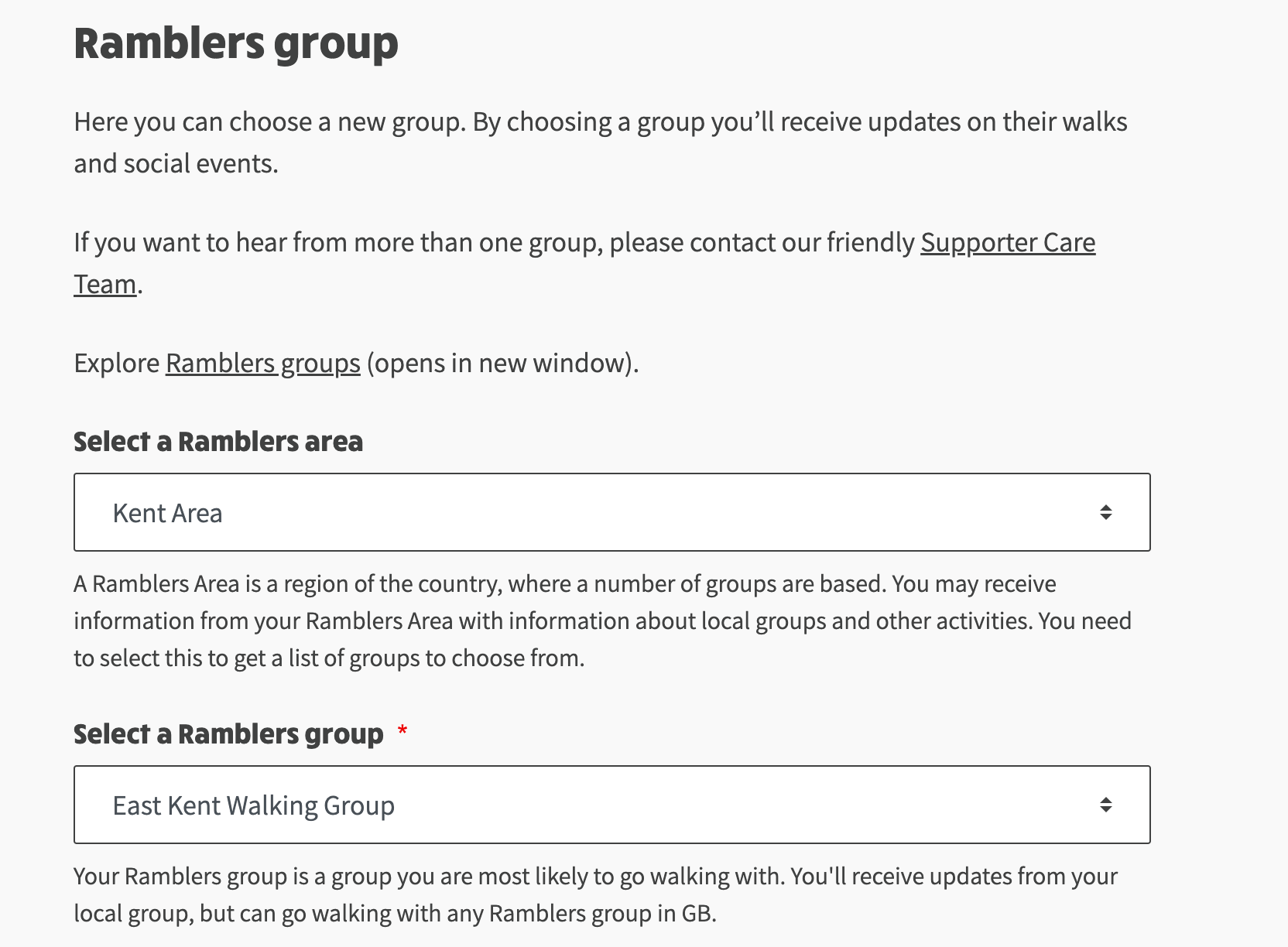\n\n* If you have any problem with this, feel free to contact our [Membership Administrator](mailto:membership@ekwg.co.uk) and we’ll arrange the transfer for you.","contentHtml":"How to Join or Transfer to EKWG
\n
\n
\nHow to join EKWG
\n\n- You can join online via the Ramblers website by clicking the link above.
\n- Enter your "Ramblers Group" as "East Kent Walking Group" (KT50), and you'll be made a member of EKWG.
\n- If you join online, it sometimes takes a couple of weeks for us to receive your details, so please send your contact details to our Membership Administrator so that we can add you to our mailing lists immediately.
\n
\nHow to transfer to EKWG
\n\n- If you’re already a member of another Ramblers group and you have an active login account for Ramblers, you can immediately transfer your group membership to EKWG by logging Into Ramblers and going to My Account by clicking on the following button:
\n
\nMy Account
\n\n- From the my account page, choose My Groups, and then click the Change Ramblers Group button.
\n- Choose Area: Kent and Group: East Kent Walking, then click Confirm Selection button. See below for example screenshot:
\n
\n
\n\n- If you have any problem with this, feel free to contact our Membership Administrator and we’ll arrange the transfer for you.
\n
\n"}